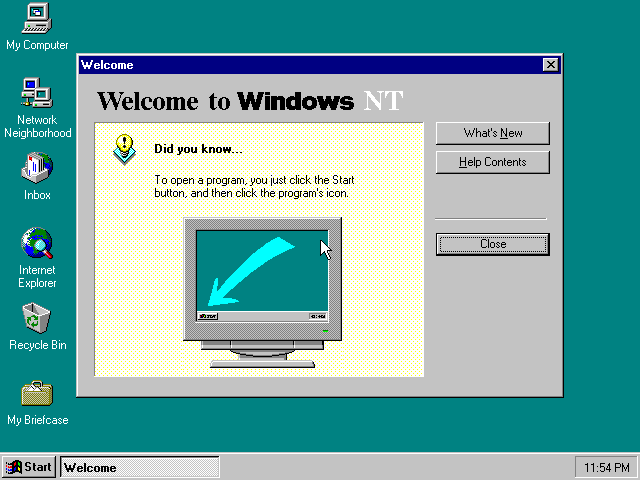
Windows NT 4.0 for PowerPC on the Apple Network Server 500/700: a HAL, an ADB driver and an ARC firmware, all built from source, on one boot floppy. Source on GitHub.
Nothing on the floppy is Microsoft's; it is GPL-2.0-only, like everything here. You still need the Network Server's Open Firmware 2.26NT ROM and your own Windows NT 4.0 Workstation for PowerPC CD.
| LICENSE | 18,092 bytes | 8177f97513213526df2cf6184d8ff986c675afb514d4e68a404010521b880643 |
| NOTICE | 7,859 bytes | 0090c0731bb3fc2e31ca2e8dd1ceb7bd21eadba12c96fc0c6826483e704a9cfd |
| SHA256SUMS | 347 bytes | |
| powermac-nt-hal-v1.0-boot-floppy.img | 1,474,560 bytes | fe7fbf3590d9556b88bdf7958e4b9805da8c7d27c17652ae92f50f41322ce84b |
| powermac-nt-hal-v1.0-parts.zip | 52,069 bytes | 4b43413537f4bac06e6890feaccb6ede35533b5451056eefec29f57d062f654b |
Every key you press, from a cold machine to the Windows NT logon screen. About forty minutes of wall-clock time on an emulated machine, most of it NT copying files. Nothing is written to your CD image at any point.
| The emulator | Granny Smith, main, built with make headless (or make run for the browser). EMULATOR.md is the setup page |
| The Open Firmware 2.26NT ROM for the Network Server | MD5 ad405e01c663340c479668c70f741f1b, from the TinkerDifferent thread. It must be the NT ROM; the production 1.1.22 ROM cannot run NT at all |
| A Windows NT 4.0 Workstation for PowerPC CD image | OEM 000-48303, October 1996, MD5 ab37556d72818ed082c1d01c2d7f1898. It is read, never written |
| Its Product ID | the digits on the Certificate of Authenticity. GUI Setup will not continue without one |
clang-18, lld-18, python3 | to build this repository. No Microsoft tool, header or DDK |
make floppy                               # -> build/boot-floppy.img
make disk                                 # -> build/nt-disk.img, 512 MB
make floppy compiles the HAL, the ADB driver and the ARC firmware and lays them out, with a txtsetup.oem and three Open Firmware scripts, as a 1.44 MB FAT12 image of seven files. Nothing on it comes off the CD; it is GPL-2.0-only and may be shared, and every release carries one. The build is reproducible: the same tree gives a byte-identical floppy.
make disk writes an empty disk with the one thing Setup insists on before it will start: an ARC system partition, 32 MB of FAT at the front, which on a real ARC machine ARCINST.EXE would create. Install to the second partition; the first is where the firmware reads OSLOADER.EXE and HAL.DLL from.
Rebuild the floppy whenever you rebuild the HAL, the ADB driver or the ARC firmware: the copies on the floppy are the ones Setup and the disk boot load.
| Model | Network Server 500 (model=ans500) |
| ROM | the 2.26NT ROM |
| RAM | 64 MB. Not the 32 MB default; see below |
| CD | your NT CD at SCSI id 0 on the first fast/wide controller (/bandit/53c825@11) |
| Disk | nt-disk.img at SCSI id 0 on the second controller (/bandit/53c825@12) |
| Floppy | boot-floppy.img in the internal drive |
Headless:
./build/headless/gs-headless --speed=turbo rom=<2.26NT.rom> model=ans500 ram=65536 \
      drive=scsi:0:cd:/path/to/nt4-ppc.iso drive=scsi2:0:hd:/path/to/nt-disk.img \
      fd0=/path/to/boot-floppy.img
In the browser, set RAM to 64 MB and attach the three images; the defaults put the CD and the disk at the right ids.
The ids are hardcoded in the floppy's scripts: boot.of points the firmware at /bandit/53c825@11/sd@0,0 and bootdisk.of at /bandit/53c825@12/sd@0,0. A CD anywhere else gets you to the firmware and then arcfw: fatal: cannot load '...\PPC\SETUPLDR'.
RAM is not negotiable. setup.of puts the load address at 62 MB. On a 32 MB machine the load still says ok, and the eval then fails with an unknown word whose name prints as a run of blanks. That blank word is the signature of too little RAM.
Cold-boot. The firmware tries its default device, fails, and stops at 0 >. That failure is normal.
Once per machine (it saves little-endian mode and the load addresses to NVRAM, then resets):
load fd:,\setup.of
load-base loadsize eval
Wait for 0 > to come back. Then, to install:
load fd:,\boot.of
load-base loadsize eval
You should see the firmware load, the floppy read into RAM, and SETUPLDR start off the CD:
Loading PE/COFF image_base 50000
powermac-nt-hal: reading the OEM disk into RAM (this takes a while) .........
powermac-nt-hal: B40 blocks of the OEM disk are in RAM
powermac-nt-hal: starting Windows NT Setup

Arcfw 0.1: ARC firmware for the Apple Network Server (powermac-nt-hal)
arcfw: system parameter block at 4000, 37 vector entries
arcfw: KSEG0 mapped, 800000 bytes
arcfw: configuration tree built
arcfw: booting 'multi(0)scsi(0)cdrom(0)fdisk(0)\PPC\SETUPLDR'
arcfw: loaded at 80600000..80647200, entry descriptor 80641aac
arcfw: starting the loader
then SETUPLDR's blue Windows NT Setup screen on the serial console and the monitor.
The comma after fd: is required: Open Firmware reads what follows : as a partition number. dir fd:,\ lists the floppy if you want to check the drive is live first.
The first screens come through the firmware onto the serial console and the screen alike; from the kernel onward Setup draws on the monitor and takes the ADB keyboard.
| Screen | Press |
| Select the computer type | ↓ to Other, Enter. Enter again for the support disk (the floppy is already in). One entry is offered, Apple Network Server 500/700: Enter |
| Mass storage | the step everyone skips. S, then Other, Enter, and pick Apple Desktop Bus keyboard and mouse, and the OEM disk (powermac-nt-hal). The list then shows two devices: Enter |
| Video adapter | ↑ twice from Other to Motorola Power Stack (cirrus 54xx), the CD's own entry, Enter. (Floppies built before 5 November 2026 offered Cirrus Logic 54M30 (Apple Network Server 500/700) under Other instead, carrying a patched driver; the HAL no longer needs it) |
| Welcome to Setup | Enter |
| Mass storage (NT's own list) | Enter |
| Licence | Page Down eighteen times, then F8 |
| Hardware list | should read Apple Network Server 500/700, the Cirrus Logic display you chose, XT, AT, or Enhanced Keyboard. Enter |
| Partitions | ↓ twice to D:, the 478 MB partition. Enter. Never C:, the system partition |
| File system | Enter on Leave the current file system intact. Not NTFS: the firmware reads FAT only, and the installed system boots from it |
| Directory | Enter for \WINNT |
| Disk examination | Esc to skip it |
| Copying | ten to fifteen minutes |
| This portion of Setup has completed successfully | Enter. NT restarts the machine through Cuda and the firmware comes back to 0 > |
Why the mass-storage step matters: SETUPLDR takes your keystrokes through the firmware, so everything works until NT's own keyboard stack starts, which is several screens later. The ADB driver is what gives NT a keyboard, and [SCSI] is the one class SETUPLDR loads arbitrary drivers for. Skip it and Setup dies with "Setup did not find a keyboard connected to your computer", which is unrecoverable. The same driver serves the floppy image in RAM to the copy phase, since NT has no driver for the real drive.
Back at 0 >, with the same floppy in the drive:
load fd:,\bootdisk.of
load-base loadsize eval
bootdisk.of loads this project's ARC firmware (ARCFW.EXE, built from src/arcfw; no Microsoft code runs before NT's loader), sets the ARC environment for this boot, and points the firmware at the disk. Arcfw 0.1 reports what it found (it asks only SCSI target 0 and the targets the boot variables name; setenv ARCFW-SCSI-TARGETS all at the prompt makes it scan every id, at a selection timeout for each absent one), OSLOADER's menu shows Windows NT Workstation Version 4.00, the kernel loads, the HAL comes up, and after autochk the Setup wizard is drawn:
Loading PE/COFF image_base 50000
powermac-nt-hal: starting the installed Windows NT

Arcfw 0.1: ARC firmware for the Apple Network Server (powermac-nt-hal)
arcfw: system parameter block at 4000, 37 vector entries
arcfw: KSEG0 mapped, 800000 bytes
arcfw: configuration tree built
arcfw: booting 'multi(0)scsi(1)disk(0)rdisk(0)partition(1)\os\winnt40\osloader.exe'
arcfw: loaded at 80600000..8064a800, entry descriptor 80643d38
arcfw: starting the loader
OS Loader V4.00
setenv ARCFW-DEBUG 7fff at the 0 > prompt before the load makes the firmware trace every ARC call NT's loader makes (the tree it hands over, the memory descriptors, every Open, Read and GetEnvironmentVariable) on the serial console; setenv ARCFW-DEBUG 0 turns it off again. The value is kept in NVRAM.
Every page takes Enter on its default button except the three marked.
| Page | Press |
| Welcome | Enter |
| Setup Options | Enter (Typical) |
| Name and Organization | type a name, Enter |
| Registration | the Product ID. The boxes do not auto-advance: type the first group, Tab, the next. All seventeen digits typed straight through leaves five in the first box and "The Product Id you entered is not valid", which is not a rejected key |
| Computer Name | type a name, Enter |
| Administrator Account | Enter (an empty password is accepted) |
| Emergency Repair Disk | ↓ to No, do not create, Enter. The only floppy NT can see is the RAM disk |
| Select Components | Enter |
| Windows NT Networking | Enter |
| How to participate on a network | ↑ to Do not connect this computer to a network at this time, Enter. There is no adapter driver; the default's search finds nothing and leaves Next greyed |
| Finishing Setup | Enter |
| Date/Time, Display | Enter through them. Detection names a cirrus compatible display adapter at 256 colours |
| Windows NT 4.00 has been installed successfully | Enter. NT restarts |
At 0 > again, bootdisk.of and its eval one more time, and the installed system boots to Press Ctrl + Alt + Delete to log on. Ctrl+Alt+Del on the ADB keyboard (Option is Alt) brings up Logon Information; Enter logs Administrator on with the empty password, and the desktop comes up with its Welcome to Windows NT dialog.
The guest's writes go to the emulator's own copy of the disk image. Before you stop the machine, export it from the emulator's shell:
machine.scsi2.device[0].image.export("nt-installed.img")
It refuses to overwrite, so remove the destination first. To put a rebuilt HAL onto an installed disk without running Setup again, the loader takes HAL.DLL from the system partition (partition 1), not from \WINNT\system32:
python3 tools/fatput.py nt-installed.img 1 '\OS\WINNT40\HAL.DLL' build/hal.dll
| Symptom | Cause |
load fd:\boot.of says PARTITION is not a number | the comma: fd:,\boot.of |
eval reports an unknown word printed as blanks | 32 MB of RAM; the machine needs 64 |
arcfw: fatal: cannot load '...cdrom(0)fdisk(0)\PPC\SETUPLDR' | the CD is not at id 0 on the first controller, or it is not an NT 4.0 PowerPC CD |
arcfw: fatal: cannot load 'multi(0)scsi(1)disk(0)...osloader.exe' | the disk is not at id 0 on the second controller, or its system partition has no \OS\WINNT40\OSLOADER.EXE yet (text-mode Setup has not completed) |
arcfw: fatal: no OSLOADER in the environment | bootdisk.of was not what ran; it sets the ARC variables on /options before starting the firmware |
arcfw prints its banner and nothing after starting the loader | setenv ARCFW-DEBUG 7fff, boot again, and read the trace |
| Setup did not find a keyboard connected to your computer | the ADB driver was not added at the mass-storage screen (S, Other). Start over |
| The Product Id you entered is not valid | the digits were typed into one box; Tab between the three |
| GUI Setup shows a backdrop and one grey Back button | a HAL older than 17 September on the system partition; see section 6 |
| Restarting computer… sits for ever | the same old HAL. Nothing is lost; cold-boot the machine |
Granny Smith's integration tests ans-nt-install and ans-nt-installed-boot type every line and key on this page unattended; tests/integration/ans-nt-install/test.script there is the authoritative, runnable form of it.